
Already a Badger customer
Their account is ready before they arrive
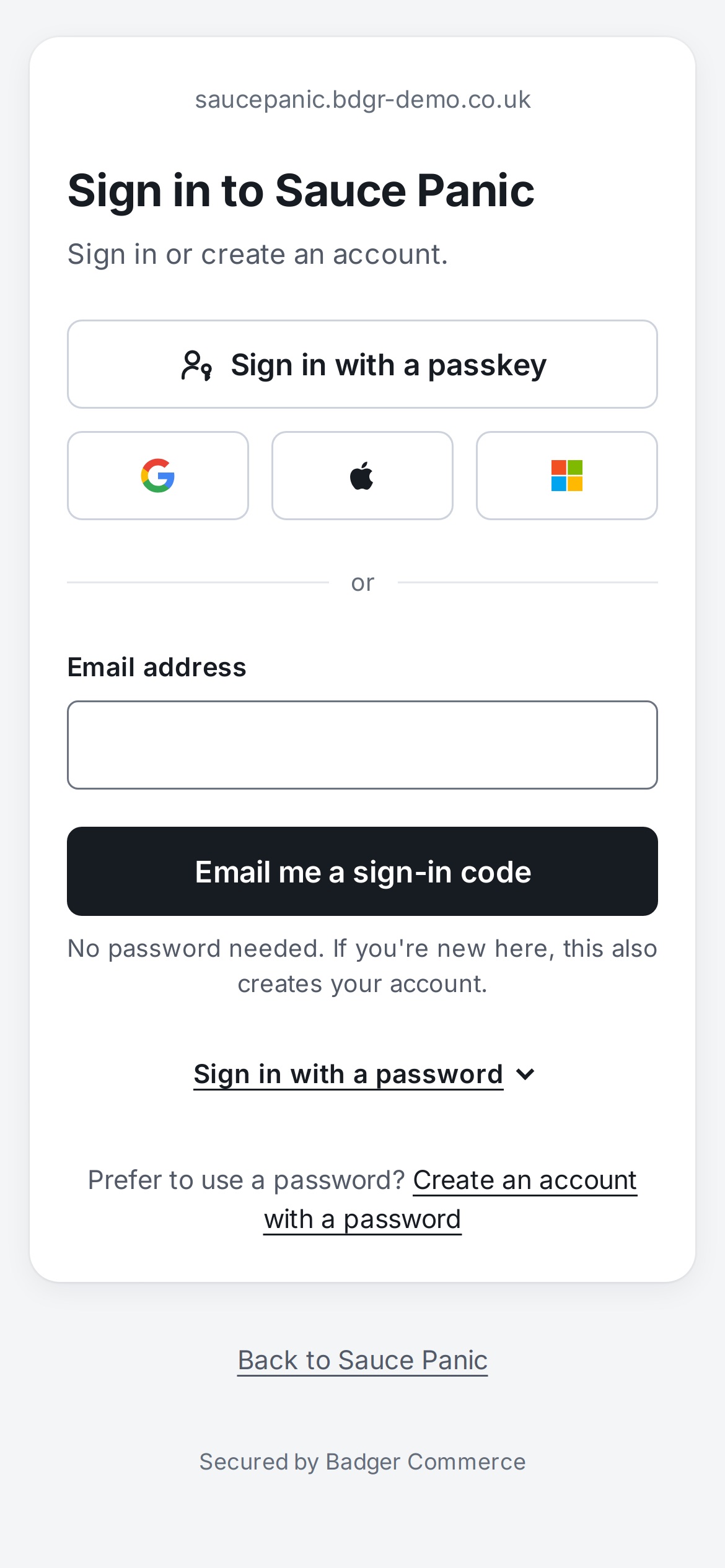
Each person has one Badger account for their email address. Someone who has signed in to another Badger shop signs in to yours with the passkey, Google, Apple or Microsoft account or emailed code they already use. There's nothing to register and no new password to think up.
The first time they come to your shop, they're asked whether to continue as the account they're signed in with, beside your shop's name. Nobody is signed in to a new shop without being asked
"Use another account" signs them out, which matters on a shared or family computer
Your shop then starts its own customer account for them, with nothing from any other shop in it
A customer with no Badger account yet makes one by typing the code we email them
Privacy between shops
What's shared, and what each shop keeps to itself
The Badger account only proves who someone is. Everything about their relationship with a shop lives in that shop's own account, separate from every other shop's.
Their Badger account
Your shop's customer account
What it holds
Their email address, name and how they sign in: passkeys, a password if they set one, and linked Google, Apple or Microsoft accounts
Their orders, saved addresses, contact details, basket, donations and everything else they do with you
Who can see it
Badger's sign-in service. When they sign in, your shop is given their name and email address, nothing more
Your shop, and any sister shops you run together, such as one per currency
What other shops see
Nothing. A shop isn't told which other Badger shops someone uses
Nothing. One shop never sees another shop's customers, orders or addresses
Passwords and passkeys are checked by the sign-in service and never reach any shop
Signing in doesn't give a shop the customer's orders or addresses from anywhere else: those are only ever what they give your shop
Customers can see the browsers they're signed in on and sign out of them all at once
Ways in
Every sensible way to sign in
Passkeys first, because they're the quickest and hardest to steal. Everything else is there for the people who want it.
Passkeys
A fingerprint, face or device PIN, offered first on the sign-in page. After someone signs in with an emailed code, we offer to set one up so next time is quicker.
Emailed code or link
No password needed: a six-digit code and a link in one email. If the address is new to Badger, using the code creates the account.
Google, Apple and Microsoft
Including Microsoft 365 work and school accounts and personal Outlook.com accounts.
A password, if they prefer
Still there for anyone who wants one, with one clear rule for what makes a good one.
"Last used"
The sign-in page marks the way this browser last signed in. Only the method is remembered, in that browser, never who it was.
In your shop's name
The sign-in page carries your shop's name, your logo if you have one, and a link back to your shop.
Security
Built so accounts can't be taken over
Email confirmed first
A new account works only once its owner has typed the code sent to the address. Nobody can register someone else's email and get at their orders.
Doesn't say who has an account
Sign-in is designed not to reveal whether an address has an account, so it can't be used to check who shops where.
Microsoft accounts checked properly
A Microsoft sign-in is only trusted for an address Microsoft vouches for, so nobody can sign in as a customer by putting their address on an account of their own.
Guessing is slowed down
Repeated wrong passwords make the account wait before it can try again.
Existing customers move across
When a shop switches to Badger sign-in, customers sign in with their old password and confirm their email once. Their orders come with them.
Ours, not a third party's
We build and run the sign-in service on the same platform as your shop. Google, Apple and Microsoft are only ever an option for the customer.
For your team
The same sign-in for the admin, the till and your AI assistant
Staff sign in to the Badger admin, the Badger app and AI connections such as Claude with the same Badger account, and pick which shop to work on. Each shop decides what each person may do there.
Changing roles and other sensitive admin changes ask staff to confirm it's them again, for example with an emailed code
An AI connection is tied to one shop, with only the permissions ticked when it was approved
The till app asks which shop to sign in to, so nobody types a shop address on a phone
Staff added to the till get an invitation from your shop by email
On every new shop
Every new shop starts on Badger sign-in. Moving an existing shop across is a switch we turn on for you.